Release Notes October 2025

Dear Educators,

We’re pleased to share the NextOS October release updates.

We’re continuously working to make NextOS better—so you can accomplish tasks more easily, make smarter decisions, and breeze through your daily work.

These release notes will keep you informed, help you explore new features, and ensure you’re getting the most out of what’s new.

Smart Pay Concession – Enhancement

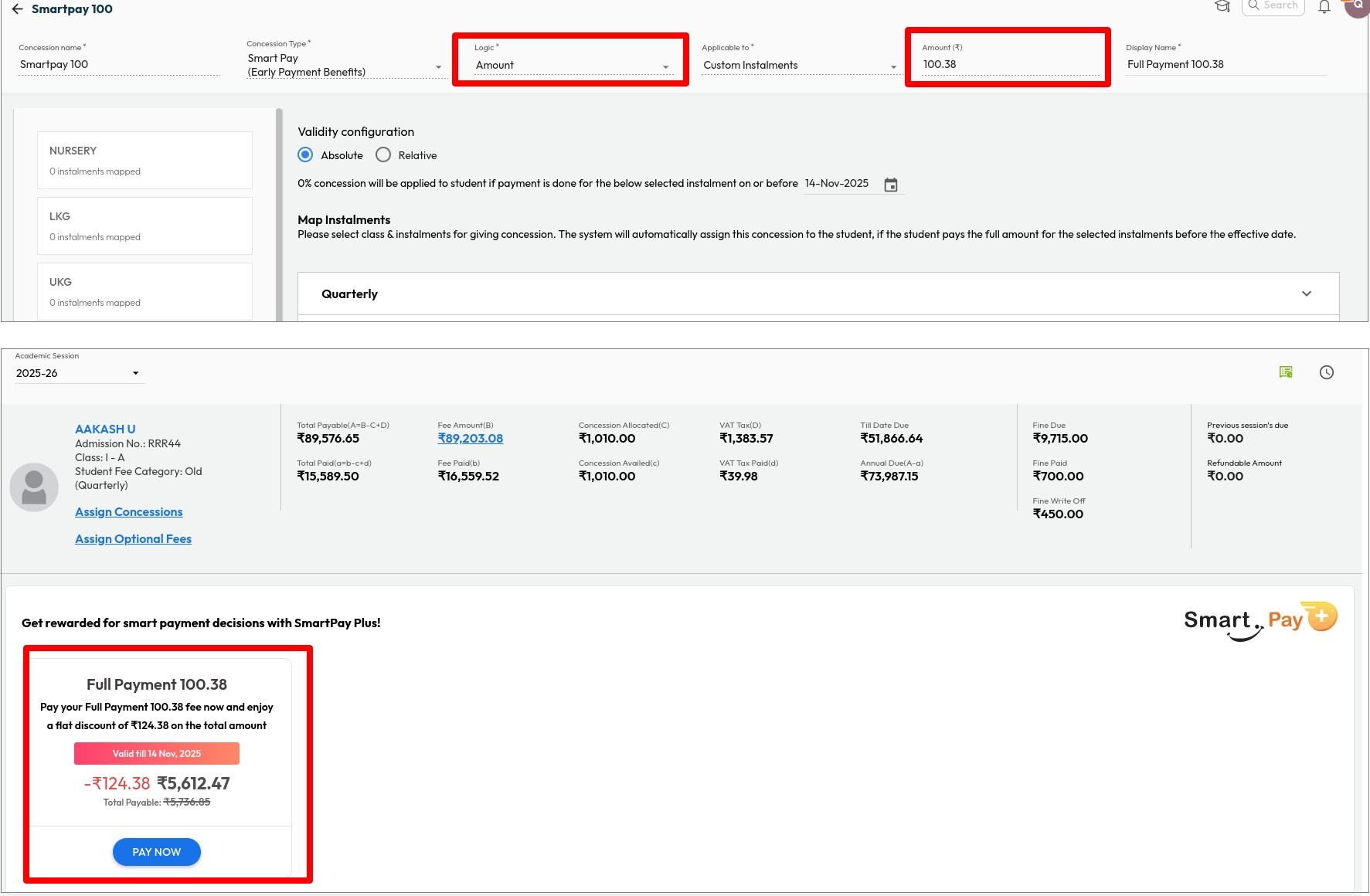
What’s New : Schools can now configure Smart Pay Concession as a fixed amount, in addition to the existing percentage-based option.

Benefit : Provides better control over concession limits, allowing schools to set a fixed total amount as per their policy or student strength.

Path : Settings > Finance > Fee > Fee Concession > Concession Master > Add New > Select Concession Type as Smart Pay Concession > Logic as Amount

New Look & Flow for Assessment Creation

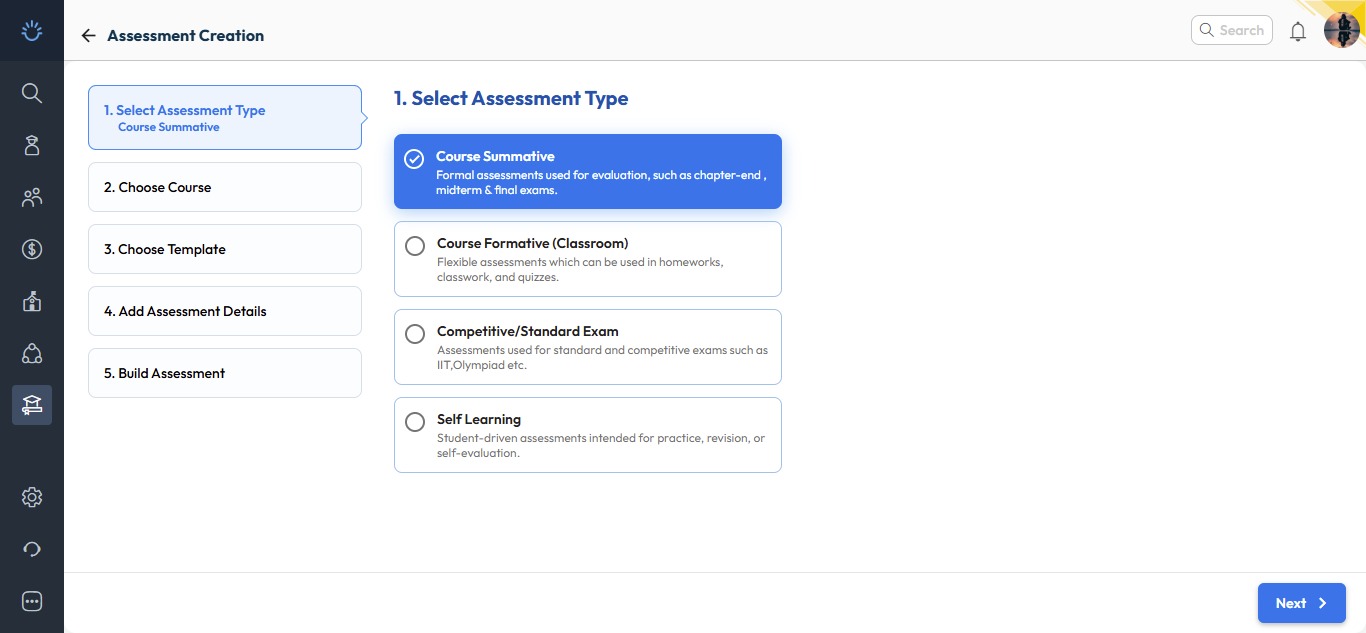
We’ve introduced a more engaging and streamlined experience for one of the most used tools – Assessment Creation. The new interface is now available under Resource Management – Home, while the old flow remains accessible via the Assessment/Exam Corner section.

What’s New :

The revamped assessment creation process now follows a simple five-step guided wizard for ease of use and clarity.

  1. Select Assessment Type:
    Choose the type of assessment you wish to create:

    • Course summative
    • Course formative
    • Competitive / Standard Exam
    • Self Learning
  2. Select Course:

    Pick the relevant board, class, and subject for which you want to create the exam paper.

  3. Choose Exam Paper Structure / Template:

    Select a predefined structure or template to maintain consistent print formats.

  4. Add Assessment Details:
    Enter essential details such as:

    • Assessment name
    • Duration
    • Language of the paper
    • Tags for easy tracking
  5. Build Assessment:
    Finally build it as per your choice, e.g.:

    • Select cognitive frameworks like Bloom’s Taxonomy or Webb’s Depth Levels.
    • Define criteria and autofetch questions from the Next Education Question Bank.
    • Update header details and save your inputs.
    • Download the ready-to-print question paper instantly.

Why it Matters :

These enhancements make assessment creation more intuitive, flexible, and globally adaptable, empowering schools to design question papers that meet diverse academic needs with greater efficiency.

Path : Academics > Teacher Workspace > Resource Management – Home > Resource Creation > Click Assessment

Revamp of Principal Reports UI

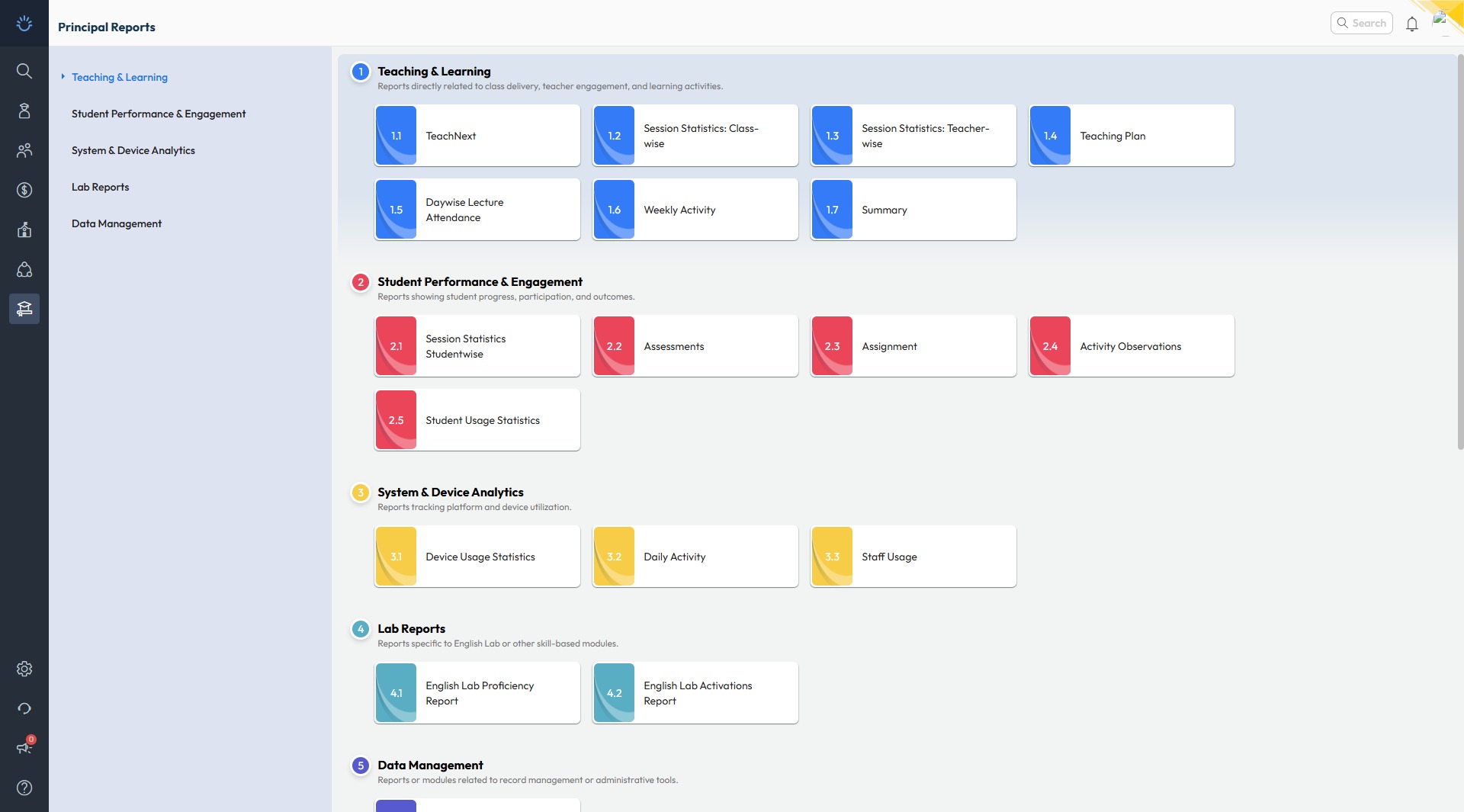
Improvement : The Principal Reports section in the Teacher Workspace has been redesigned
with a new, modern look for smoother navigation and improved usability. Reports are now
organized with different categories for quicker access.

Impact : Enables Principals and Academic Coordinators to access key reports easily, saving time
and effort in daily academic review.

Locate : Academics > Teacher Workspace > Principal Reports

Auto Resize of Student Photos in Bulk Upload

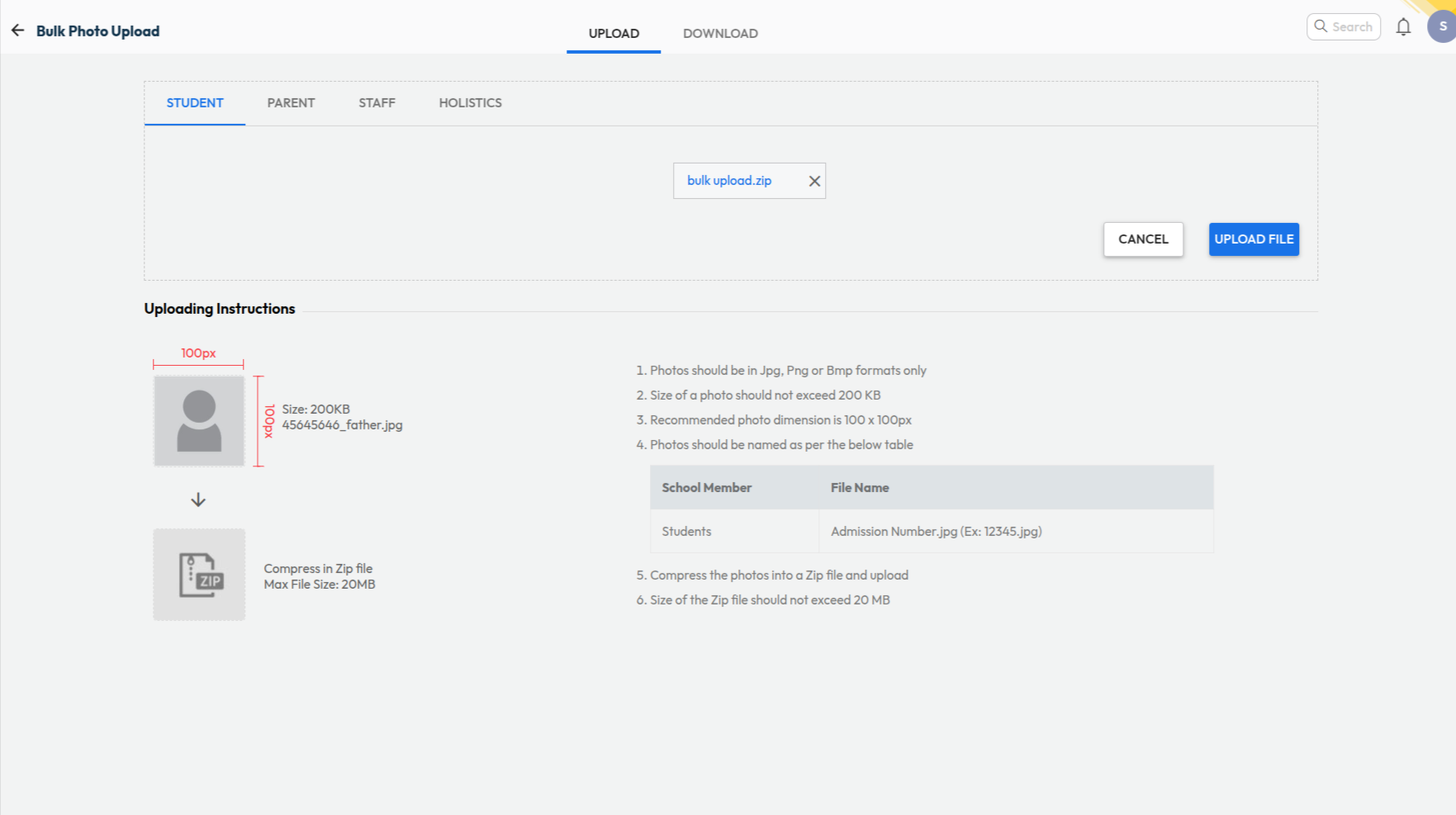
What’s New : Student photos uploaded in bulk are now automatically resized to meet system requirements. Earlier, photos had to be manually compressed to below 200KB before upload.

Benefit : Allows admins to upload bulk photo files of varying sizes easily — the system automatically compresses and uploads them successfully, saving time and effort.

Path : Settings > Administration > School Setup > Student Bulk Photo Upload

NextOS Chat – New Avtar

What’s New : The all-new NextOS Chat is smarter, faster, and designed exclusively for schools — enabling secure and seamless communication among all stakeholders.

Direct 1-to-1 Chats: Instantly start conversations between:

  • Staff – Staff
  • Parent – Staff

Regular Groups : Create custom groups for specific purposes with choice of participants like :

  • Event based – Annual Day, Field Trips etc.
  • Staff only groups
  • Announcements for parents(View only)

Smart Groups : System manages the participants automatically based on school records

  • Class Teacher – Parents
  • Subject Teacher – Parents

Central Control : Exhaustive settings to control chat for staff/parents

Benefit : A new-age communication platform built for schools — fostering collaboration and engagement between teachers, parents, and administrators without sharing personal contact details.

Path : Communication > Chat > New Chat > New Group > Smart Group
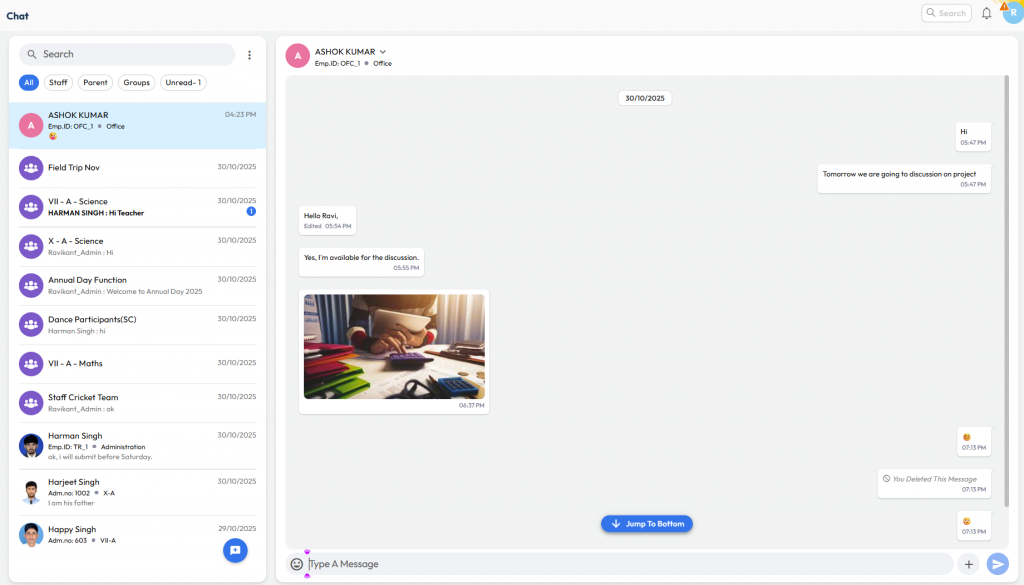
How is NextOS Chat better for School-Parent Communication?

NextOS Chat is purpose-built for schools, designed to support the day-to-day communication needs of teachers, parents, and administrators.

If you’ve been using WhatsApp for school communication, here’s how NextOS Chat can offer much smarter, safer, and more organized alternative for all your parent and staff interactions.

Feature WhatsApp NextOS Chat
Access Anyone with a number Role-based and secure
Privacy Contact Info is public
Conversations are private
Contact Info is private
Conversation can be monitored
Group Management Manual, Tedious Automatic, Smart Groups
User Context ❌ – Guess the parent ✅ Clear Info about student/parent
Central Control ❌ – No way to manage ✅ Easily manage all conversations
Monitoring ❌ – Get added to all groups ✅ Monitor without getting added
Built for Personal use School & School only