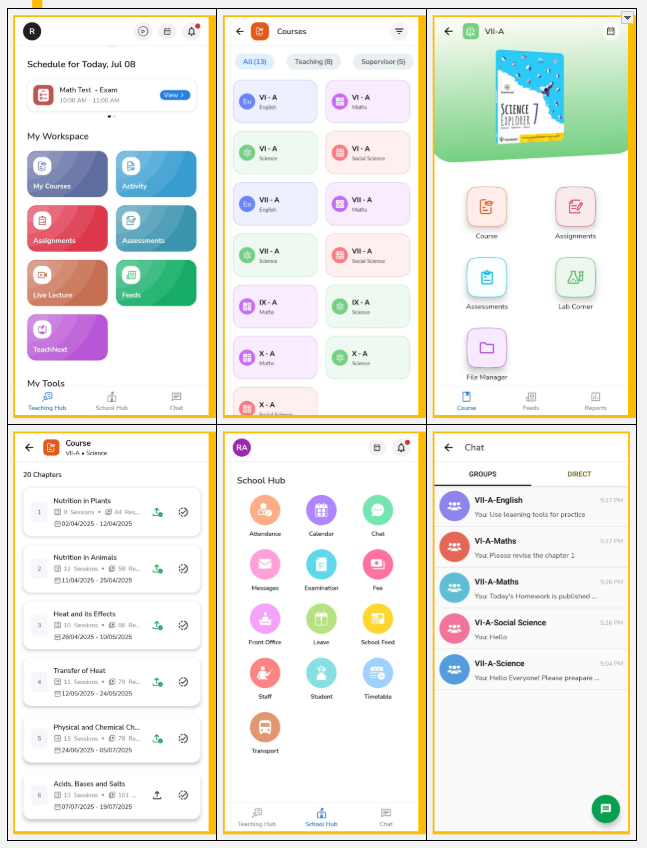
We’ve introduced a fresh, engaging interface and a native My Courses build for faster loading and smoother navigation in the staff account.
What’s new:
-
- Teaching hub
Your new homepage is now the Teaching Hub – a central space for all teaching essentials like daily schedules, My Courses, Activities, Assignments, Assessments, Live Lectures, Feeds, TeachNext, and more.
- Teaching hub
- New UI for My Courses
We’ve redesigned My Courses on the NextOS mobile app to help teachers work faster and smarter. Key highlights :
- Faster Access with native mobile build
- Teaching & Supervising courses sho wn as per role
- Easy access to Course Plan, Assignments, Assessments, Lab Corner, and File Manager
- Feeds & Reports now at the bottom for quick access
- New tab view with Chapters, Sessions & Resources
- Publish and mark chapters complete from the same screen
- School hub
The former school corner is now the School Hub – Navigate here to quickly access attendance, calendar, chat, messages, school feed, timetable and more – all in one place. - Chat
Chat is now easily accessible – start group or direct conversations with parents without sharing your phone number.
Why it Matters::
The new experience is designed to be more intuitive, faster, and staff-friendly, enabling teachers to navigate seamlessly and focus more on teaching with ease.