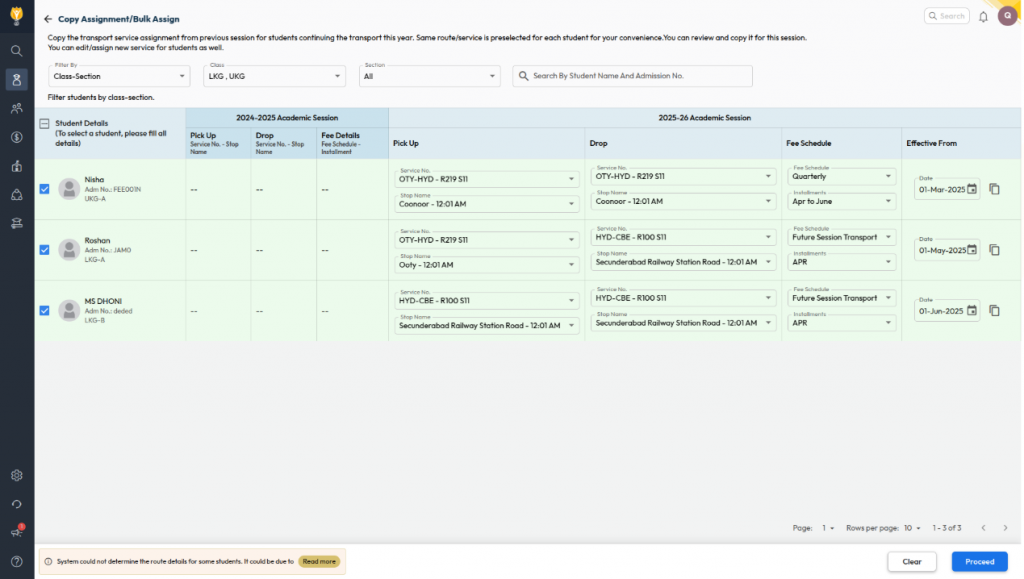
What’s New :Transport service assignments can now be copied from the previous academic year and managed in bulk for the new assignment.
Filters are available to view student lists in two modes:
Class–Section:
- Displays all unassigned students based on class–section.
- For students who opted for transport last year, route information is auto-populated.
- For new students, users can manually select route details.
Route & Class Wise:
- Fetches students based on last year’s transport details.
- Route info is auto-filled if the service/route/stop names remain the same.
- Users can select an effective date per student or copy the same date across all rows.
Benefit : Simplifies transport allocation on a single screen by reducing manual work, ensuring
accurate assignments, and saving time for Admins and Transport Incharges.
Path : Student > Student Transport > Assign Transport Service > Copy Assignment/Bulk Assign