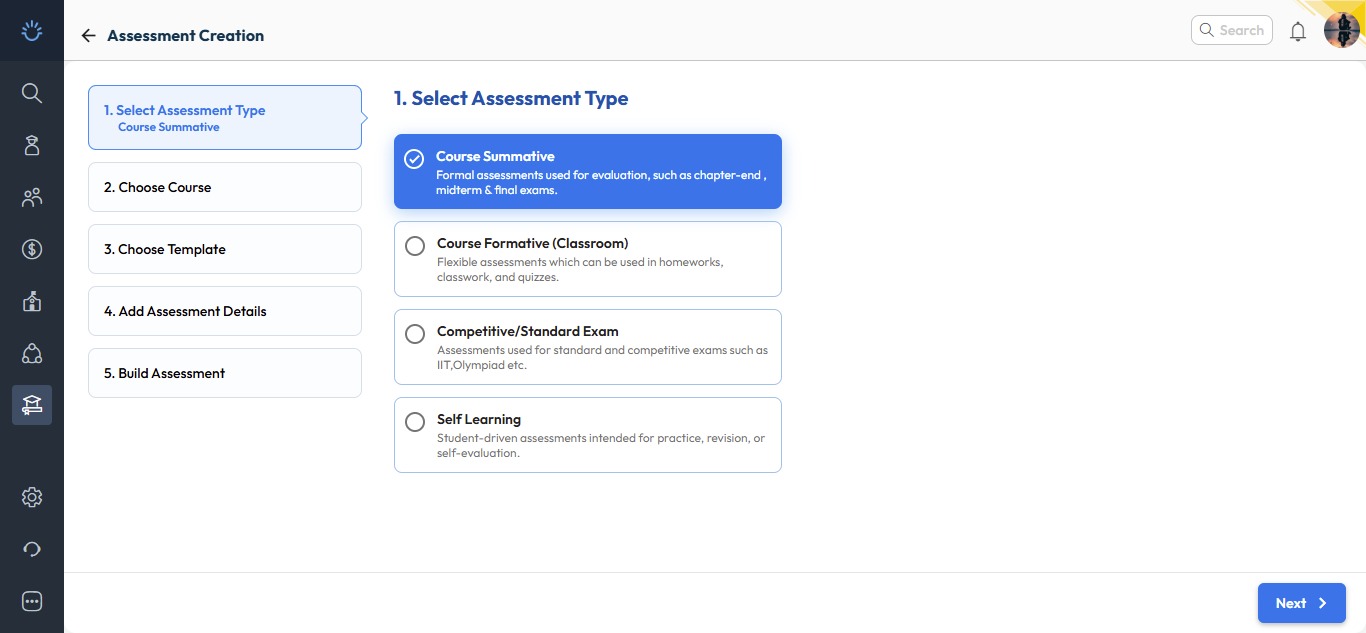
We’ve introduced a more engaging and streamlined experience for one of the most used tools – Assessment Creation. The new interface is now available under Resource Management – Home, while the old flow remains accessible via the Assessment/Exam Corner section.
What’s New :
The revamped assessment creation process now follows a simple five-step guided wizard for ease of use and clarity.
- Select Assessment Type:
Choose the type of assessment you wish to create:- Course summative
- Course formative
- Competitive / Standard Exam
- Self Learning
- Select Course:
Pick the relevant board, class, and subject for which you want to create the exam paper.
- Choose Exam Paper Structure / Template:
Select a predefined structure or template to maintain consistent print formats.
- Add Assessment Details:
Enter essential details such as:- Assessment name
- Duration
- Language of the paper
- Tags for easy tracking
- Build Assessment:
Finally build it as per your choice, e.g.:- Select cognitive frameworks like Bloom’s Taxonomy or Webb’s Depth Levels.
- Define criteria and autofetch questions from the Next Education Question Bank.
- Update header details and save your inputs.
- Download the ready-to-print question paper instantly.
Why it Matters :
These enhancements make assessment creation more intuitive, flexible, and globally adaptable, empowering schools to design question papers that meet diverse academic needs with greater efficiency.
Path : Academics > Teacher Workspace > Resource Management – Home > Resource Creation > Click Assessment