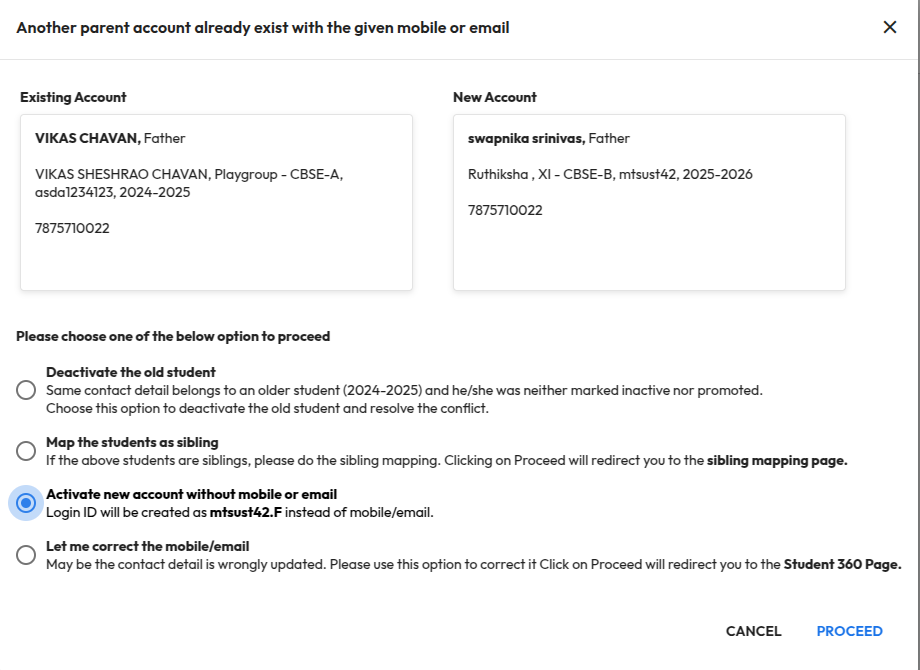
Improvement : Earlier, creating a parent account with duplicate contact details showed the error “Account already exists with this contact”. Now, the system guides you with clear options to resolve such conflicts:
- Deactivate the old student : This will deactivate the old student record and the respective accounts. The new account will be activated automatically.
- Map the student as sibling : This option will redirect to the sibling mapping page to merge students with the same contact information.
- Activate new account without mobile or email : This option will create accounts based on the admission number without using mobile/email. For example, AdmissionNo.F can be used for Father and AdmissionNo.M for Mother.
- Let me correct the mobile/email : This option redirects to the Student 360 page, where you can update the contact details if they were entered incorrectly.
Impact : Makes it easier for an administrator to handle parent account conflicts, fix contact issues quickly, ensuring accurate records and a smoother onboarding experience.
Locate : School Setup > User Account Management > Parent